There is one structural disadvantage in cold calendar invite outreach that almost nobody plans around, and it has nothing to do with copy, targeting, or deliverability.
You cannot see the prospect’s calendar.
Inside your own company, scheduling is a solved problem. You open the scheduling assistant, you see free/busy for everyone on the invite, you drop the meeting into white space. Outside your company, that visibility is gone. Free/busy lookup across organizations only works when the two domains have an explicit calendar interop or federation relationship configured, which your cold prospect’s IT team has certainly not set up with you. So every cold invite you send is a blind guess at one specific hour of one specific day in a stranger’s week.
Guess wrong and you are not just unlucky. You have handed the prospect a reason to decline that has nothing to do with whether they wanted the meeting.
This is the single most underrated cause of lost acceptances in calendar outreach, and unlike most causes it is a math problem rather than a persuasion problem. Which means you can actually fix it.
What the prospect sees when your invite collides
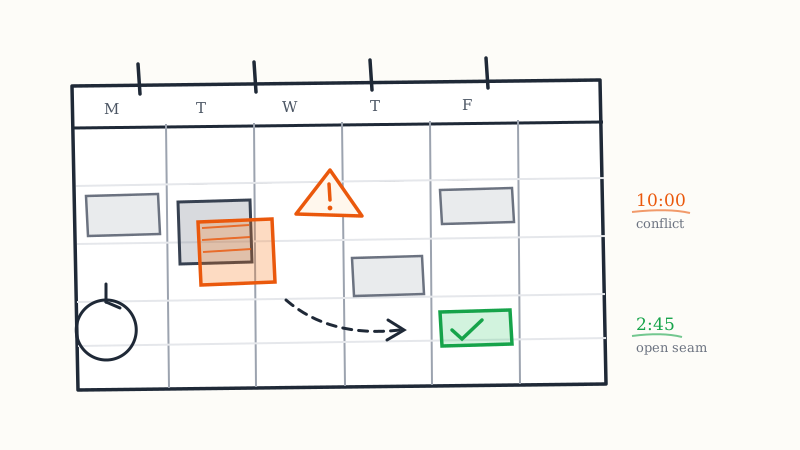
This is the part teams get wrong, because they assume an overlapping invite just sits there quietly next to the existing meeting. It does not. Both major calendar clients actively flag the collision at the exact moment the prospect is deciding.
Outlook and Microsoft 365. When a meeting request arrives for a time the recipient is already booked, Outlook surfaces a conflict notice in the request itself, directly above the accept and decline buttons. On desktop and web it reads as a line telling the user this conflicts with another appointment on their calendar, sometimes naming the conflicting event. The prospect does not have to go look. The software tells them.
Google Calendar. Gmail renders the invite inline with a small calendar preview showing the proposed slot in context, with the existing event visible beside or behind it. Open the event in Calendar and the overlap is rendered as two stacked blocks competing for the same column. Google also drives the “propose a new time” affordance harder than Outlook does, which is the one thing working in your favor here.
Apple Calendar. Less aggressive about the warning, but the overlap is visually obvious the moment the event is opened in day view.
So the real sequence on a conflict is not “prospect considers your meeting.” It is “prospect is told, before reading your description, that saying yes creates a problem.” You are now asking a stranger to do calendar surgery as the entry cost of hearing your pitch. Almost nobody does that for a cold invite, even when the invite is good and the timing is right.
The decline you get back is a logistics decline wearing the costume of a rejection. And in most CRMs it gets logged as the second thing.
The math nobody runs
Here is the calculation worth doing once for your segment.
Take a target persona and estimate how much of their working week is already committed. Mid-level operators in most B2B companies run somewhere around 40 to 55 percent of business hours in meetings. Directors and VPs run higher. Senior executives in sales, operations, and finance functions routinely sit above 70 percent during business hours, and well above that in quarter-end weeks.
Now treat a single untargeted invite as a random draw against that density. At 50 percent occupancy, half your invites hit an occupied slot before anyone evaluates your message. At 70 percent, you are losing more than two of every three to collision alone. Those are not copy failures. No subject line survives a conflict warning.
This explains a pattern most teams notice but misdiagnose: acceptance rates that drop as you move up-market. The usual read is that senior buyers are harder to reach. Part of it is simply that senior buyers have less white space, so the same invite has fewer places to land. KALI publishes 8 to 12 percent acceptance rates against the 1 to 3 percent typical of cold email reply rates, and a meaningful part of closing the gap between the bottom and the top of that range is conflict avoidance rather than better writing.
The good news: a random draw is the worst possible strategy, and almost everyone is using it.
Pick times by density, not by preference
You cannot see one prospect’s calendar. You can absolutely model the shape of a typical calendar in your segment, because corporate meeting culture is remarkably uniform.
Avoid the standing-meeting block. Monday morning between 9 and 11 is the densest block in B2B. It is where weekly team meetings, pipeline reviews, sprint plannings, and leadership syncs live. Tuesday and Thursday from 10 to 12 are the next densest, because that is where recurring customer and cross-functional meetings get parked. Sending cold invites into these windows is sending into a wall.
Go for the seams. Mid to late afternoon, roughly 2 to 4 in the prospect’s local time, is reliably lower density than late morning. Wednesday is structurally the lightest day of the week in most companies, because it is nobody’s default for a recurring sync. The 15 or 20 minutes right after a typical meeting ends is a real seam, which is the next point.
Offset off the top of the hour. This is the highest-leverage change on this list and it takes one minute to implement. Nearly every recurring corporate meeting starts on the hour or the half hour. If you propose 10:00, you are competing with the single most popular start time in the business world. Propose 10:15 or 2:45 instead and you are aiming at the gap between standing meetings rather than at the meetings themselves. Offset starts also read as deliberate, which helps the invite look considered rather than blasted.
Default to 15 minutes, not 30. A 15-minute invite fits in far more places than a 30-minute invite, and the difference compounds against a dense calendar. The tradeoff is real and worth understanding before you commit, which we covered in detail in the piece on 15 versus 30 minute cold invites. For conflict purposes alone, shorter wins.
Do not propose the same slot twice. If an account declines Tuesday at 10, the follow-up invite must not be Tuesday at 10 next week. Recurring meetings recur. You will hit the identical conflict and look like you were not paying attention.
Respect the time zone before anything else. A perfectly chosen 2:45pm slot is worthless if you picked it in your zone and the prospect reads it as 11:45pm theirs. Every heuristic above is stated in the prospect’s local time, and multi-region campaigns have to resolve zone per record rather than per campaign.
Your own double-booking problem
There is a second conflict risk pointed the other way, and it is the one that actually embarrasses teams in front of buyers.
If you send 200 invites proposing Wednesday at 2:15 and 18 of them accept, you have 18 meetings stacked on one slot on your own calendar. Seventeen of those get an apologetic reschedule email from you within hours of the prospect saying yes.
That is the worst possible first impression. The prospect did exactly what you asked, immediately, and your reward was to move the meeting. It reads as a bulk campaign, because it was one. Expect a chunk of those to quietly never re-accept.
Three things prevent it:
Cap accepted meetings per slot. Spread proposed times across the sending batch so no single slot can absorb more acceptances than one rep can actually hold. If your acceptance rate is 10 percent and you send 200 invites, no slot should appear more than roughly 8 to 10 times.
Hold a reschedule buffer. Keep adjacent time blocked and uninvited so a collision can move 15 minutes instead of moving to next week. A 15-minute shift feels like a small adjustment. A seven-day slip kills momentum and raises no-show risk.
Deduplicate at the account level. Two reps inviting two people at the same company for overlapping times is a visible internal coordination failure, and prospects do talk internally. Account-level suppression, either in your CRM or in the sending layer, is what stops it. This is one of the operational reasons teams move the motion to a managed service like KALI, where slot distribution, volume ramp, and per-account suppression are handled as part of how the campaign runs rather than as a spreadsheet one rep maintains by hand.
How to handle a conflict decline
Conflict declines are the most recoverable response in the whole motion, and most teams throw them away.
Read the decline reason. Both Google and Outlook let a declining invitee attach a note, and conflict declines very often carry one: “I have a conflict,” “already booked then,” “can we do another time.” That last phrase is a buying signal with a scheduling problem attached, not a no. Capture decline notes as structured data and categorize them. Conflict, wrong person, no interest, and not now are four completely different outcomes, and lumping them into “declined” destroys the most useful signal in the channel.
Re-offer exactly once, with two options. Send one new invite for a different day and a different time of day, not just a different week at the same hour. If your tooling supports it, offer two concrete slots. Do not ask the open-ended “what works for you,” which puts the scheduling labor back on a prospect who has not yet decided you are worth it.
Treat a proposed new time as an acceptance. When a prospect uses Google’s or Outlook’s propose-new-time feature, they have agreed to the meeting and are negotiating logistics. Accept whatever they propose, immediately, even if it is inconvenient. Never counter-propose against a prospect who already did the work.
Let tentative sit. A tentative RSVP usually means the slot is contested and the prospect has not resolved it. Leave it alone for about 48 hours, then send one short note offering to move it rather than asking whether they are still coming. Do not treat tentative as a yes for forecasting, and do not pressure it into a no.
Never re-invite a hard decline. A decline with no conflict language and no note is a no. Re-inviting it is how you generate complaints, and complaints are how you damage the sending reputation that the whole channel depends on.
Instrument the slot, not just the campaign
Most calendar outreach reporting stops at campaign-level acceptance rate. That number cannot tell you whether a campaign underperformed because the message was wrong or because you aimed it at Monday at 9.
Track acceptance by proposed day of week, by hour, by offset versus top of hour, and by meeting length. Within a few hundred sends you will have your own segment-specific density map, and it will beat every general heuristic in this article, including all of mine. Enterprise IT buyers, clinical staff, and retail operators have completely different week shapes, and the only way to learn yours is to measure at the slot level.
Then track decline reason as a category rather than a free-text field, so conflict rate becomes a number you can watch. If conflict is driving more than a third of your declines, your slot strategy is the bottleneck and no amount of copy iteration will move the campaign.
A managed service reports this layer for you. KALI reports acceptance rates, attendance, and meetings booked in real time as part of the calendar outreach tooling, which means the slot-level learning accumulates across campaigns instead of living in one rep’s head.
The short version
You are scheduling blind, against calendars that are 50 to 70 percent full, with software that warns the prospect about your collision before they read your pitch. That is the actual game.
Play it by aiming at the seams rather than the standing meetings: Wednesday over Monday, mid-afternoon over late morning, 10:15 over 10:00, 15 minutes over 30, prospect local time always. Cap how many acceptances any single slot can absorb so you never reschedule a prospect who said yes. And treat every conflict decline as a logistics problem to re-offer once, not a rejection to log and forget.
Conflict avoidance is the cheapest acceptance-rate improvement available in this channel, because it costs nothing but a change to which hour you pick.
If you would rather not build the density model and the slot distribution logic yourself, KALI runs cold calendar invite outreach as a fully managed service: you provide the target list, KALI personalizes and delivers the invites, manages follow-ups and show-up reminders, and reports acceptance and attendance in real time. See how it works or pricing.