Every other outbound channel is append-only. You send a cold email and it sits in an inbox forever exactly as written. You send a LinkedIn message and it stays in the thread. If you got something wrong, your only option is to send another message on top of it.
Calendar outreach is different, and the difference is the part most teams never think through.
When you send a cold calendar invite, you are not dropping a message into a queue. You are writing a row into someone else’s calendar database. And unlike an email, you can go back and change that row later. Change the time, change the title, change the description, or delete it entirely, and the prospect’s calendar updates to match.
That capability is genuinely useful. It is also the single easiest way to turn a warm, accepted meeting into a confused prospect who declines the next thing you send.
The reason is that “edit the invite” is not one action. It is three different actions with three different effects on the prospect’s side, and the calendar interface hides which one you just triggered. This post is about knowing which lever you pulled before you pull it.
What actually happens when you change an invite
Under the hood, a calendar invite is an iCalendar object with a unique identifier (the UID) and a revision counter (the SEQUENCE). When you first send the invite, your calendar server publishes that object to the prospect’s server with the method set to REQUEST and the sequence at zero.
When you edit the event, your server does not create a new object. It increments the sequence on the same UID and republishes it. The prospect’s calendar matches on UID, sees a higher sequence number, and overwrites what it had.
Three consequences follow from that, and all three matter commercially.
The prospect gets a notification you did not write. Their client generates it, not you. Google and Outlook both produce an “Updated invitation” or “Meeting updated” message that highlights what changed, usually with the old value struck through and the new value next to it. You have no control over the subject line, the layout, or the tone. If you edit an invite five times to fix typos, the prospect receives five of these.
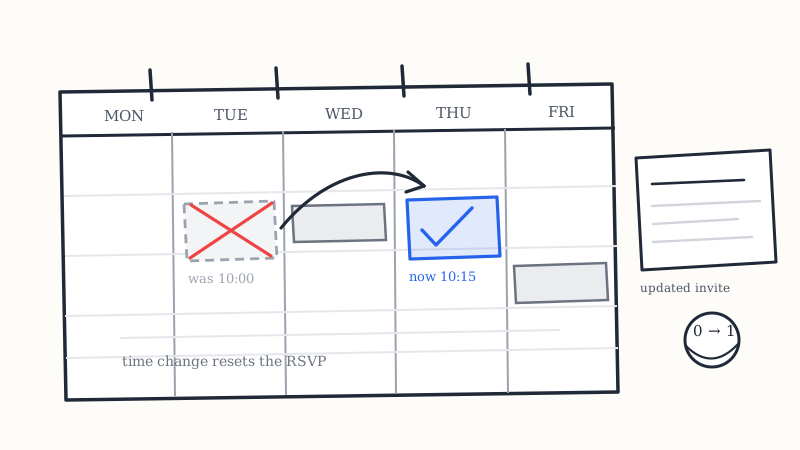
A time change usually resets the RSVP. This is the expensive one. On both Google Calendar and Exchange, moving the start time of an event with attendees typically clears their response and puts the invite back into a “needs action” state. A prospect who accepted on Tuesday and watched you move the meeting on Wednesday is no longer an accepted attendee. They are a pending attendee who now has to decide a second time, with less novelty and more friction than the first time. Edits that do not touch the time (description, title, location in many configurations) generally do not reset responses.
A delete is not a silent delete. Removing an event with attendees sends a CANCEL, and the prospect’s calendar either strikes the event through or removes it outright, with a cancellation notice. There is no way to quietly take back an invite that has already been delivered. The prospect will know.
Put together: editing a live invite is a loud operation with a real chance of undoing an acceptance you already earned. It is still the right move sometimes. It is never the default.
The three moves, and when each one is correct
Move 1: update in place
Keep the same event, change a field, let the sequence bump. The prospect sees an update notice on an event they already have.
Use it when the prospect has already accepted and the meeting is still happening. The accepted event is an asset. It is sitting in their week, it will fire their own reminder, and it already survived the hardest decision. You do not want to destroy it and start over.
Use it also for any non-time edit at any stage: adding the conferencing link you forgot, improving a thin description, correcting the agenda. These are cheap, they do not reset the RSVP, and the notification reads as an organizer being thorough.
Avoid it for a time change on an invite that has not been answered yet. See move 2.
Move 2: cancel and send fresh
Cancel the original event, then send a new invite with a new UID at the new time.
Use it when the invite is unanswered and you want a different slot. An unanswered invite has no accumulated value to protect. There is nothing to preserve, so the update notification buys you nothing and costs you a confusing “this changed” frame on a meeting the prospect never agreed to. A clean new invite at a better time reads as a first ask, which is the frame that actually converts.
Use it also when the change is large enough that the old event is no longer recognizably the same meeting: a different attendee set on your side, a materially different purpose, a slot more than a week or two away from the original.
One sequencing rule: cancel first, then send. Reverse the order and the prospect holds two invites from you simultaneously, and your cancellation lands after the new invite and reads as if you just killed the thing you proposed thirty seconds ago.
Move 3: do not touch the invite at all, reply instead
Leave the event exactly as it is and negotiate the new time in the message thread.
Use it whenever the prospect is the one who raised the time problem. If they replied “can we do Thursday instead,” the correct response is a short message confirming Thursday and then one clean invite, not an immediate silent edit. Unilaterally moving an event in someone else’s calendar before you have confirmed the alternative is the kind of thing that gets a sender muted.
Use it also when the prospect’s client has offered a counter-proposal. Both Outlook and Google Calendar let an attendee propose a new time rather than simply declining, and that response is one of the highest-intent signals in the entire channel. A proposed new time is not a decline. It is an acceptance with a constraint attached. Take the time they offered and send the invite for it.
A decision table you can actually use
| Situation | Move | Why |
|---|---|---|
| Accepted, you need a different hour | Update in place | Protect the acceptance, take the RSVP reset as unavoidable cost |
| Unanswered, you want a better slot | Cancel and resend | Nothing to protect, a fresh ask converts better than an update notice |
| Unanswered, conferencing link missing | Update in place | Non-time edit, no RSVP reset, improves the invite |
| Prospect asked to move it | Reply first, then one invite | Never move someone’s calendar before confirming |
| Prospect proposed a new time | Accept their time, send for it | Highest-intent signal in the channel |
| Prospect no-showed | New invite, new thread | The old event is spent, see below |
| Deal is dead | Cancel, do not replace | Leaving a dead meeting on their calendar is worse than cancelling |
| You sent to the wrong person | Cancel immediately, no resend | Own the error, do not compound it |
Rescheduling after a no-show
This is the most common reschedule scenario in cold calendar outreach, and the most commonly botched.
A prospect accepted, the hour arrived, nobody joined. The instinct is to reopen the original event and move it to next week. Resist that. The original event is spent. Its acceptance has been functionally revoked by the no-show, the event is now in the past in their calendar history, and dragging a past meeting forward reads as pursuit rather than as an offer.
What works is treating it as a new, slightly warmer first touch. Send a fresh invite, shorter than the original, and let the message acknowledge the miss without any edge to it. Something close to this:
Looks like our Tuesday slot got away from us. Sent a new one for Thursday at 10:15 in case the week opened up. If a different time is easier, propose one and I will take it.
Three things are doing work there. It names the miss without assigning blame, which removes the awkwardness that otherwise stops a prospect from re-engaging. It gives a specific new slot rather than asking them to go find one. And it explicitly invites a counter-proposal, which routes the prospect into the highest-converting response path available.
Note that the real fix for no-shows happens before the meeting, not after. Attendance on booked meetings sits in a 35 to 45 percent band across cold calendar invite campaigns, and the lever that moves it most is a well-timed reminder rather than a well-written recovery. KALI sends AI-personalized show-up reminders before every booked meeting for exactly this reason, so that fewer meetings ever reach the recovery stage. A reschedule you never had to send is the cheapest reschedule available.
How many reschedules is too many
Two moves on the same meeting, then stop.
The first reschedule is unremarkable. Calendars move, the prospect’s does too, and nobody reads a single time change as anything other than normal professional life.
The second reschedule starts to read as disorganization, and it burns the specific thing calendar outreach is good at. The channel works because an invite carries an implicit claim of commitment: you picked a real hour and you intend to be there. Each move weakens that claim.
By the third move, the meeting has become a recurring interruption rather than an appointment. The prospect does not usually tell you this. They just stop responding to the update notices, and you lose the deal to accumulated friction rather than to any objection you could have handled.
If you are past two moves, change the shape of the ask instead. Offer a shorter slot, offer an async alternative, or park the account for a cycle and come back with a fresh reason. Any of those beat a fourth update notification.
Message templates for each move
Time change on an accepted meeting. Send a short note alongside the update so your words arrive with the system notification instead of after it.
Had to move our Wednesday call by an hour. Updated invite is in your calendar for 2:15 the same day. Same agenda, same length. If that hour is worse for you, say the word and I will move it back out.
Cancel and resend on an unanswered invite. Do not explain the cancellation. The prospect never engaged with the first one, so referencing it just advertises that you have been sending them things they ignored.
Sent over a short slot for Thursday at 9:30 to walk through how teams in your space are handling outbound right now. Fifteen minutes, accept or propose another time.
Prospect-requested move. Confirm in words first, then send exactly one invite.
Thursday works. Sending one over for 11:00 your time, and I will keep it to twenty minutes.
Cancellation with no replacement. When the deal is dead, cancel cleanly. Leaving a meeting nobody intends to attend on a prospect’s calendar costs you more goodwill than the cancellation does.
Taking this off your calendar so it is not sitting there. If the timing changes later this quarter, happy to pick it back up.
What to track
Most teams track acceptance rate and show rate and nothing in between. The reschedule layer has its own metrics, and they diagnose different problems.
Reschedule rate by slot. If one time band generates disproportionate reschedules, that band is wrong for your segment and the problem is in your scheduling defaults, not in your copy.
Post-reschedule acceptance rate. What fraction of moved meetings get re-accepted. A low number here usually means you are updating in place when you should be cancelling and resending, or you are moving invites that were never accepted.
Reschedule-to-show rate. Moved meetings attend at a lower rate than first-sit meetings. Knowing your specific gap tells you whether a reschedule is worth the move or whether you should be holding the original slot and letting the prospect miss it.
Counter-proposals received. Track these separately from both accepts and declines. They are the most underrated metric in calendar outreach. A rising counter-proposal rate means your targeting is right and your timing is wrong, which is the easiest problem in outbound to fix.
If your sending is wired into a CRM, log the reschedule as its own activity type rather than overwriting the original meeting record. The before-and-after pair is what makes the analysis above possible at all.
The operational problem underneath
Each of these moves is simple in isolation. The difficulty is that they have to be executed correctly across hundreds of live events on other people’s calendars, by a team under quota pressure, in an interface that makes the destructive move (drag the event to a new time) the easiest one to perform.
That is why reschedule handling is one of the quiet dividing lines between a tool and a managed motion. A sending tool hands you an interface and the full capability to break your own campaign. It cannot know that the event you just dragged was accepted four days ago, that moving it resets the RSVP, and that this is the third move on the same meeting.
Cold calendar invite outreach run as a managed service puts the sequencing decisions and the follow-up logic behind one set of rules instead of leaving them to whoever happens to be looking at the calendar that afternoon. KALI’s AI handles follow-ups for non-responders and reminders for booked meetings as part of the motion, so the reschedule path is a defined state rather than an improvised one. You can see how the full flow works from list sync through to meetings landing on your calendar.
The short version
Do not edit a live invite reflexively. Ask what you are about to overwrite.
If the prospect accepted, update in place and protect the event. If they never answered, cancel and resend clean. If they raised the time problem, confirm in words before you touch anything. If they proposed a time, take it. If they no-showed, start a new thread rather than dragging a dead event forward. And if you are on your third move, the time is not the problem anymore.
The ability to rewrite a row in someone else’s calendar is the most powerful thing about this channel. It is worth being deliberate about when you use it.